
No Asteroids Beginner Guide: Your First 15 Days
A day-by-day start for No Asteroids: how air, cargo and the launch timer work, and which upgrades pay back before day 15.
No Asteroids hands you a pickaxe, a contract worth nothing, and 5,000,000 m³ of rock on a 90-day clock. The first 15 days are not about clearing volume. They are about learning the shift loop without losing cargo, then putting every credit into the two upgrades that make the next 75 days possible: air and cargo. If you have not touched the demo, read how to play No Asteroids→ first, then come back.
What one day actually means
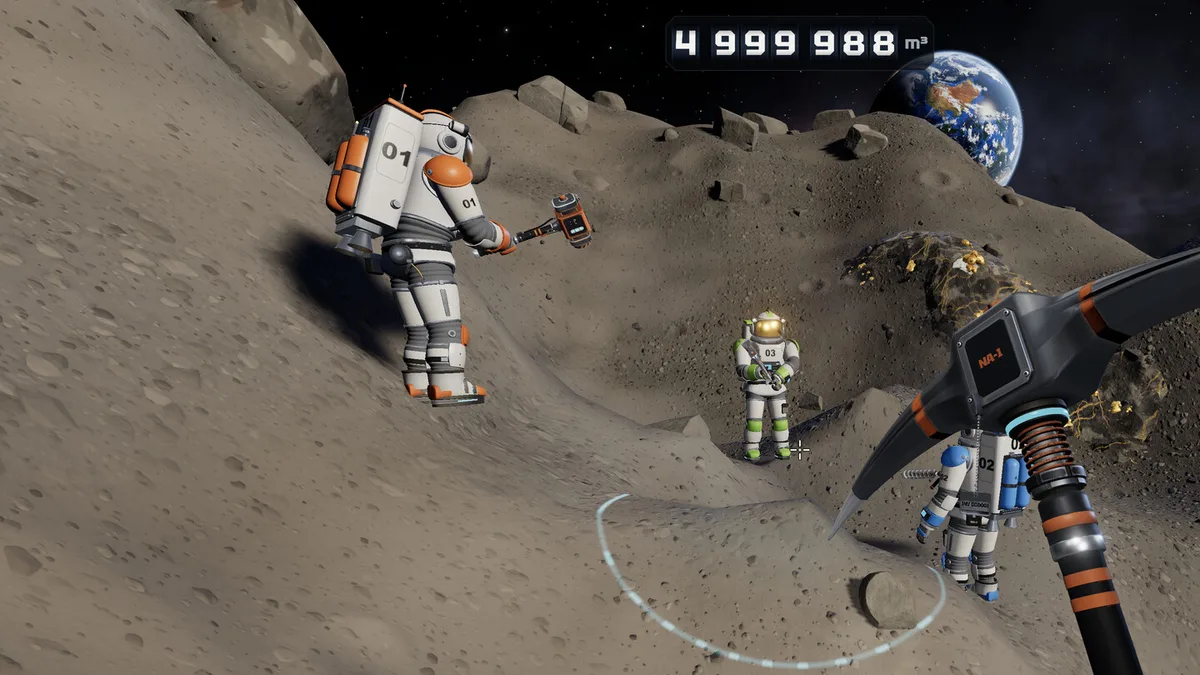
One descent is one day. The counter at the top of the screen reads DAY 3 · IMPACT IN 87; when you finish a shift and the lander returns to the ship, the day rolls over. The 90 days are 90 shifts, not 90 real-time minutes. That distinction decides how you plan: a wasted descent costs a full day of the countdown, and the impact counter never pauses.
The same HUD tracks the asteroid in cubic metres. It starts at 4,999,988 in the launch build because the first 12 m³ come off in the tutorial. A second line shows the change from the current shift, for example -2,742 m³ this shift, which is the honest measure of whether an upgrade is working.
The first shift, in order
- Read the top counter before you move. You need the day, the remaining volume and the shift delta. Everything else on the HUD is secondary.
- Scan before you dig. The scanner is bound to
Cand tags ore through rock at about 25 m, with a depth arrow such asMETEORIC IRON ↓5 M. Walking first and digging later wastes air. - Break the vein, not the wall. Ore sits in named veins with their own health bar. A pickaxe swing on
STAR GOLDshows a number per hit; a full vein breaks into chunks that float where you cut them. - Watch the air bar, not the ore. Your first tank is measured in seconds. The rule that keeps new players alive is simple: when the air bar is half gone, turn around.
- Sell everything before you buy. The terminal on the ship converts cargo to credits in one keypress (
ENTERsells the hold). Upgrades are bought from the same room, and the shop will not care that you are 200 credits short. - Buy one thing per day for the first week. Spreading 3,000 credits across three upgrades feels productive and leaves you with three weak systems.
The return trip is where beginners lose money. The lander readout in the corner (LANDER · 25 M) is the distance you still have to fly, and the launch sequence is a 10-second countdown once someone starts it. Miss the pod and your character passes out; the cargo in your suit does not come home.
Spend the first 20,000 credits in this order
Air tank first, cargo second, movement third. The first air tank upgrade adds 13 seconds according to creator footage of the demo, and 13 seconds is another vein. The cargo hold is the other half of the same equation: a full hold that reaches the ship is worth more than a half-full hold that reaches it comfortably.
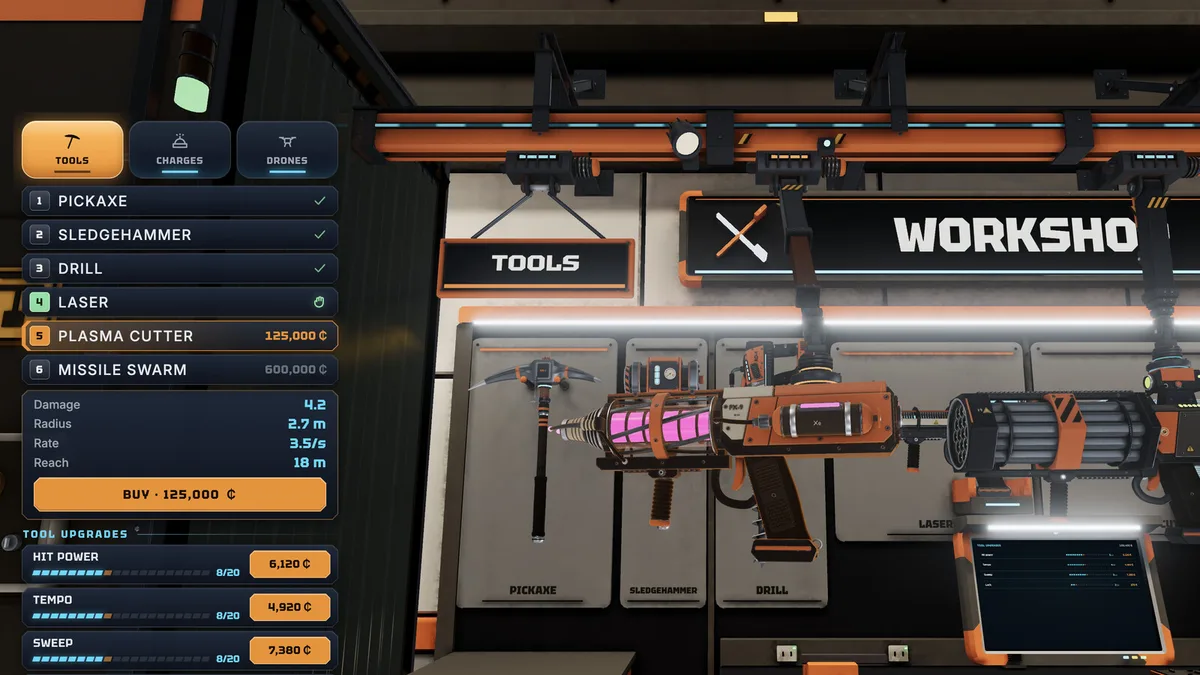
After those two, the order depends on what is annoying you. If you keep getting stuck on walls, the tether and boots earn their price. If you keep running out of air on the way back, another tank level beats a drill. The best upgrades page→ ranks them by payback instead of price.
The five minerals you will meet first
Space ice is the floor of the economy at 4¢ per unit on the day-30 terminal we captured. Meteoric iron pays 6¢, star gold 13¢, space crystal 22¢ and plasmite 28¢. Ice is everywhere and fills cargo fast, which makes it a beginner trap: a full hold of ice is worth less than a third of a hold of crystal. The full table, including the daily price swings, lives on the ore prices page→.
The launch timer is the real beginner trap
The pod does not wait for a countdown to finish politely. In the co-op screenshots a launch is already at 8 with two players still outside. In single-player the same rule applies: once the sequence starts, you have ten seconds to be inside. The game's own description is blunt about the consequence — you pass out and lose the ore you were carrying.
Two habits prevent it. First, treat the lander distance as a budget: at 100 m with 40 seconds of air, you are already late. Second, never start a launch yourself while a vein is half broken. Finish the break, grab the chunks, then run.
What to ignore until day 15
Ship guns are the most tempting sink and the worst early buy. The cheapest real gun, the autocannon, costs 20,000 credits; the turret at 1,250 is a slot filler, not a solution. Your pickaxe clears more rock per credit until your income is stable. The same goes for the museum, cosmetics and the telescope: they are content, not progress. One exception is the Order of the Day, which pays credits for ore you were going to dig anyway. Check the order before you pick a landing site, not after.
A realistic day-15 checkpoint
By the end of the demo window you should be able to afford the 42,000-credit laser drill within a day or two, or already own it, and your suit cargo should be well past the starting 40. You should also have stopped losing cargo to the launch timer entirely. If either is false, the problem is usually route planning, not the tool.
The tips list→ covers the specific mistakes that cost the most, and the mining guide→ explains how the scanner, combo multiplier and floating chunks fit together.
The 42,000 laser changes how fast every later credit arrives. Cosmetics and ship decorations are for after the contract is safe.
Frequently Asked Questions
How long is one day in No Asteroids? One descent. The day advances when the shift ends and you are back on the ship, so a fast player can burn through several days in ten minutes of real time.
Do I lose my cargo if I miss the lander? Yes. The character passes out and the suit cargo is lost. Sell before you cut it close, and start the launch sequence with time to spare.
Should I buy the 1,250 turret on day one? No. It is cheap because it is weak. Save the slot for an autocannon or rockets once your mining income is stable.
Is the demo enough to learn this? The demo covers the first 15 days, which is exactly the window this page describes. Progress carries to the full game on the same machine.
Sources
Official source: No Asteroids on Steam ↗ Official source: No Asteroids press page ↗ Tested source: Steam launch-build screenshots captured 2026-11-19 (16 images, day 1 to day 60 HUD states) Community source: No Asteroids Steam news hub ↗